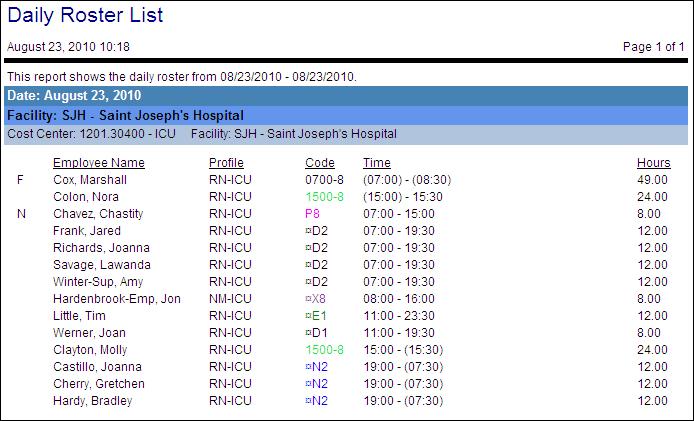
Daily Roster List
This report prints a roster for all employees in a specified organization unit, sorted by start time. This report differs from the Daily Roster by Unit report in that it is not broken down by coverage period.
If this report is run for a parent-level organization unit or a schedule group, each child organization unit has a page listing all employees scheduled to work that day.
The report fields include the date the schedule was created or submitted (optional) employee name, profile, employee phone number (optional), activity code, start/end times of the activity, and hours scheduled. A blank line can be included for notes to be written on the roster.
Note:
A symbol to the left of the activity code indicates if the activity is Pending.
Roster information symbols may be displayed to the left of the employee name or around the Time to indicate a schedule that overlaps the day, a float employee, a non-productive activity, or self scheduled activities.
Report parameters include the following options:
-
Include employees in a specified organization unit, scheduling group, or all organization units.
-
Whether the report should include published activities, pending activities, and/or calendars. Options are: Yes (default), No, or All.
Note:
Your choice is affected by how this indicator is set: Activity Code Indicator - SS Solution Standard 5 (Determines how Activity Code is shown in Self Scheduling Grid and Reports).
-
If you select Yes, the activities appear or do not appear as follows:
When the indicator is set to Y, the activities appear.
When the indicator is set to M, the activities are masked, as set by the parameter: SS Application Parameter - SS Solution Standard Alpha 1 (Determines the code shown for masked codes in the self scheduling grid and reports).
When the indicator is set to E or H, the activities do not appear.
-
If you select All, the activities appear regardless of how the indicator is set.
-
If you select No, the activities do not appear on the report.
-
-
The start date and time and the end date and time for the range to include in the report (each day has a separate page).
-
Whether to include alternate schedules of employees loaded for this report.
-
Whether to include non-productive activities (yes/no).
-
Whether to display employee phone numbers (yes/no).
-
Whether to display employee scheduled hours (yes/no).
-
Whether to include employees working in the indicated labor distribution, employees whose home labor distribution (primary or alternate home) is in the indicated labor distribution; working and home; or working, home or non-working employees.
-
Work: The employee has a schedule within the selected distribution.
-
Home: The employee has a Primary Home or Secondary Home Labor Distribution Record within the selected distribution and has a schedule during the date range selected.
-
Not Working: The employee has a Primary Home or Secondary Home Labor Distribution Record within the selected distribution and does not have a schedule during the date range selected.
-
-
Whether to include a blank line where comments can be written onto the roster.
-
Do Not Show: Hides the comment line
-
Show on Same Line: Shows the comment line on the same line as the details
-
Show on Second Line: Shows the comment line on the same line as the details and on the line below
-
-
Whether to show the date the schedule entry was submitted (yes/no).