Productivity Actual to Target
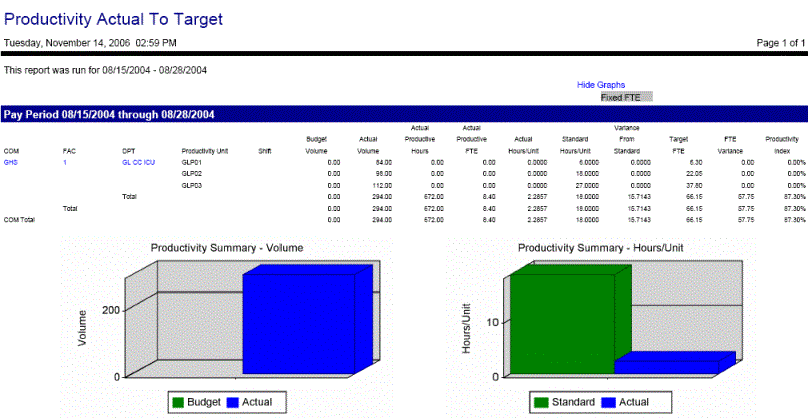
This report compares the actual productivity values to the target values.
Report fields include the Budget Volume, Actual Volume, Actual Hours, Actual Productive FTE's, Actual Hours/Units, Standard Hours/Unit, Variance from Standard, Target FTEs, FTE Variance, and Productivity Index. When the Job Class Display set up parameter is set to Setup, (and the Organization Unit Productivity Standard 4 value is set to FTE by Productivity Standard), that organization unit field can be drilled down to show Productivity Unit values.
The following options can be toggled within the resulting report in the display screen:
-
Show Graphs or Hide Graphs
-
The Show Graphs option shows a Productivity Summary - Volume bar graph for Budget and Actual values and also a Productivity Summary - Hours/Unit for Standard and Actual values.
-
The Hide Graphs option does not display any of the graphs.
-
-
Labor Distribution Drill down
-
Click on the name of a labor distribution to expand to the next lower level and show details. The lowest level displayed is either the job class or the productivity standard.
Note:
If the report is run at a lower distribution level, the totals displayed when "drilling up" only include those from the selected organization unit. For example, if the report is run for Department A at level 5, if you open the level 1 Corporate labor distribution, the values included are only those from Department A, not from the entire corporation. However, if the report is run for the Corporate level 1, the user can drill down to level 5 and view the amounts for Department A.
-
Report parameters include the following options:
-
Which organization unit to include.
-
Whether to include employees from all labor groups (by leaving the field blank) or selecting a labor group.
-
The start and end dates of the range to include in the report.
-
Whether this report is broken down by day, week, pay period, month or year.
-
Whether to include only a specified shift, or all shifts.
-
Whether to show shift details or summary information only.
-
Whether or not to show graphs of the information.
-
Whether to include all Standard Reporting Categories (by leaving this field blank) to specify a certain option.
-
Which Standard Category to include, or to include the Productivity Standard indicated as the default (which is selected in ).
-
Whether to display drill down values by job class regardless of the Productivity Standard 4 Indicator setting (Always), or whether to display either the job class or productivity standard--whichever is selected by the indicator setting (Set Up), or whether to not display job class drill down information (Never).
-
Whether to display job classes that do not have any hours assigned (Yes/No).