Home Page Preferences-Notifications
The Home Page screen defines the sections that display in each pane when the user logs into the application. When the user has chosen to receive event subscriptions by Portal, these messages are displayed in the My Unread Messages card on the Home page. This card must be selected for display in .
Note:
The settings in set up the default display for all users. Authorized users can customize the display in .
-
From , open the Home Page option.
-
In the Unassigned Sections area, highlight the My Unread Messages option.
-
Point to a section option from the Unassigned Sections column
-
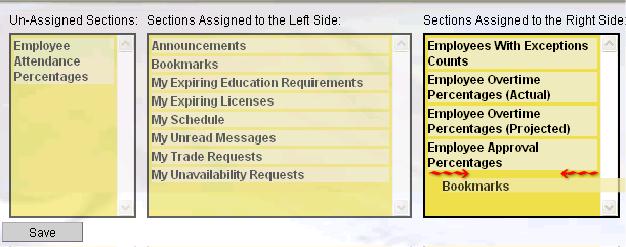
Drag it to either the Left Side column or the Right Side column.
-
Selections may be moved around within the Left Side and Right Side columns according to the order in which they should display. Point the cursor at an option and drag it to the correct position in the grid, as indicated by the red arrows
 .
. -
Click the Save button before exiting.
The selections are immediately available on the Home page.
Action Buttons
The following Action is available in the left pane:
Reset
Click on the Reset button to set the values in the open My Preferences back to the default settings set up in the System Preferences screen.